This is how to change your audio settings along with some details of what each setting does. Its worth noting that not everyones setups will have the same settings. Things such as environment, network, hardware and more can affect these settings. Feel free to tweak them until everything works for you.
1. Click "Settings"

2. Click "Sound"

3. Here, you can change audio settings including changing the microphone

5. The microphone volume / gain (how loud you will sound)

6. The Speaker or headphones the audio from the other person comes out.

8. How loud the other person will be on the phone

9. Which speaker or headphone that the ringtone comes from when you are getting an inbound call
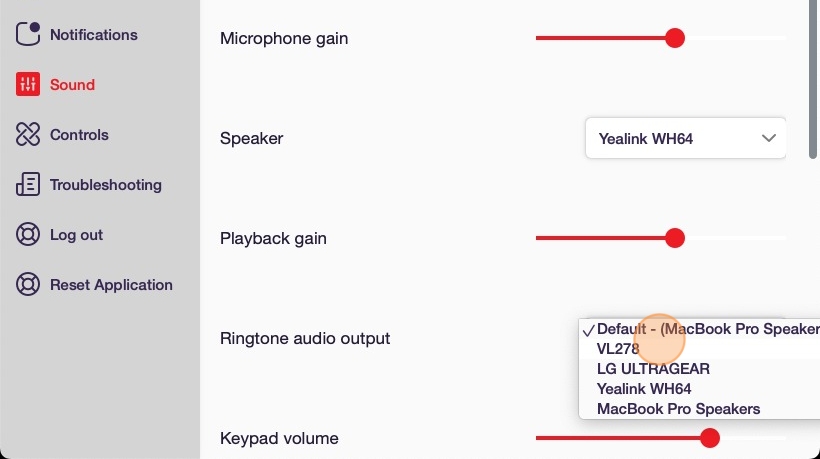
11. How loud the sound affect of you using the dial pad is.
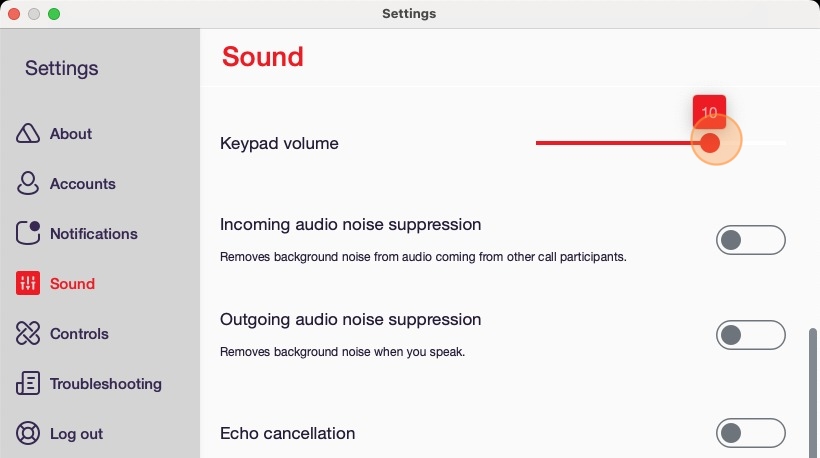
13. Incoming Noise Suppression will try to reduce background noise of the people you speak with

14. Outgoing noise suppression will try to reduce the background noise of your microphone so the other person has a better experience.

16. Echo Cancellation attempts to prevent echos from your microphone.

18. Headset integration is on some headsets from brands like Yealink. This can include indication lights, extra buttons or toggles on the physical device.
