Local numbers have two categories in Australia - Cat A (simple) or Cat C (complex).
Cat A ports will typically be resolved in 5-10 business days, however Cat C will take a minimum of 30 business days.
If the customer is not aware of what type of service they have (they usually aren't), it is quicker to submit any local number port as a Cat A. If it is a Cat A, then it will approve faster. If it is not a Cat A, it will be rejected with the reason "Complex Service" and you can resubmit as a Cat C.
Note - To submit any Cat C port, the client must have completed the Port Authority Form (PAF) from our DocuSign and have provided an invoice containing this number.
For mobile ports, there is a different form and process. Please see -
How to Port a mobile number into Jet
How to Port a local number to Jet (Cat A)
Services with Additional Numbers
Submit a Cat C port
There is an option to submit a Cat C port in Sonar, but all this does is create a Symbio ticket after a few days, so it's faster to just submit through there straight away.
Client must provide both the standard PAF form and an invoice containing this number to lodge a Cat C port.
Log into the Symbio Ticketing Portal, select Tickets and Create.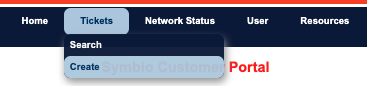
Select the ticket fields to be a Service Request, for Number Porting, Cat C Porting, Non Service Affecting, and use the Zendesk ticket number for this port as the external reference. 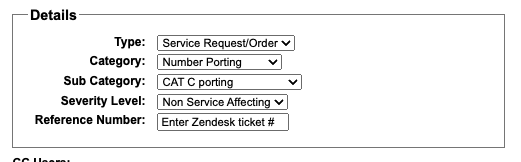
The subject should be "Cat C Port - *inset account name"
Copy + paste the description below and replace the red text:
Hi team please port the below service.

Number: *insert number(s) to be ported

Losing Carrier: *insert losing carrier name
Account Number: *insert current account number from port form

Route to 51643, PAF and Invoice attached.
Click Create down the bottom.
Then select Upload Files and upload the PAF and Invoice as 2 separate files.
Cat C timelines
| Ticket Created | 2-5 business days to be submitted |
| Pre-Port Number Validation (PNV) | Minimum 5 business days for response from Losing Carrier, average is 2-3 weeks |
| Complex Notification Advice (CNA) Sent |
Once PNV is accepted, CNA is sent and a Electronic Order is created. Minimum of 5 business days for a response from the Losing Carrier. Note - extra step + delay may occur here if this number has linked Additional Numbers. See below for more information. |
| CAT C - Booking Request Sent |
The port request has been accepted and a booking request was sent to the losing carrier for the next available appointment. Turnaround time varies, can be 2-10 business days. |
| CAT C - Booking Confirmation | Booking date must be a minimum of 10 business days in the future. A date and time will be confirmed. |
| Category C (Complex) Porting - Porting Cutover Completed |
On porting day, a notification will be sent once porting is complete (occasionally when porting starts as well, if you get a good technician). The Symbio team will test the services and then auto-resolve the ticket. You have approx. 48 hours to reply back to this ticket with issues before it is Closed. |
Services with Additional Numbers
Sometimes a phone number may have linked services, called Additional Numbers. This is only for Cat C numbers, as Cat A are single services by design.
Symbio will provide you a list of the additional numbers that are linked. These additional numbers could be part of a range - eg: 02 8316 7830 - 02 8316 7839 - or just linked by the carrier (eg signed up to a bundle, must port all or none).
When a service has Additional Numbers, the client must choose what they would like to do to proceed, and this can slow the porting process down as we give them the options, they make the decision and we then convey that decision back to Symbio.
The options are:
1. PORT & KEEP: to include, port and keep all additional associated numbers.
2. PORT & CANCEL: if the customer does not require the additional associated numbers that exist on the losing provider's network, we can include these extra numbers with the port and we will cancel and remove the numbers from your account on port cut-over completion.
note - Jet still gets charged a porting fee for these services to move across. If the client chooses Port and Cancel, we reply Port and Keep and just retain the extra numbers as stock, so as to not waste the porting fee we have to pay.
3. DISASSOCIATE: if the customer would like to keep the additional numbers on the current carrier's network and not on Symbio's network they will need to arrange with the current carrier to have the numbers disassociated first before we can proceed. (If a disassociation is selected this needs to have completed on the current carrier's side before we send the complex notification to prevent a rejection).
There are Macro templates already in Zendesk for these scenarios.
Once the client has made their selection, the Port will proceed as expected, just make sure you have the numbers configured/linked to the right account!
Especially if you are doing a Port and Cancel but retaining some as stock.